Talent Management Software for Agencies: How to Choose
What talent management software and casting software must do for a model or talent agency: database, applications, client packages, website, roles and GDPR.

Talent management software for a model or talent agency has one job: keep every person you represent, every applicant and every client request in one place, so bookers can answer fast and nobody sends an outdated portfolio or a minor's details to the wrong person. Casting software overlaps with it, but tends to focus on the client side, building shortlists and sharing them. Most agencies need both functions in one system.
This guide sets out what an agency system should do, how to compare options fairly, what data protection rules mean for your choice, and how to migrate without losing images or history. It is written for agency owners, heads of booking and office managers. It also describes our own product once as an example, and sets out criteria you can apply to any vendor.
In short
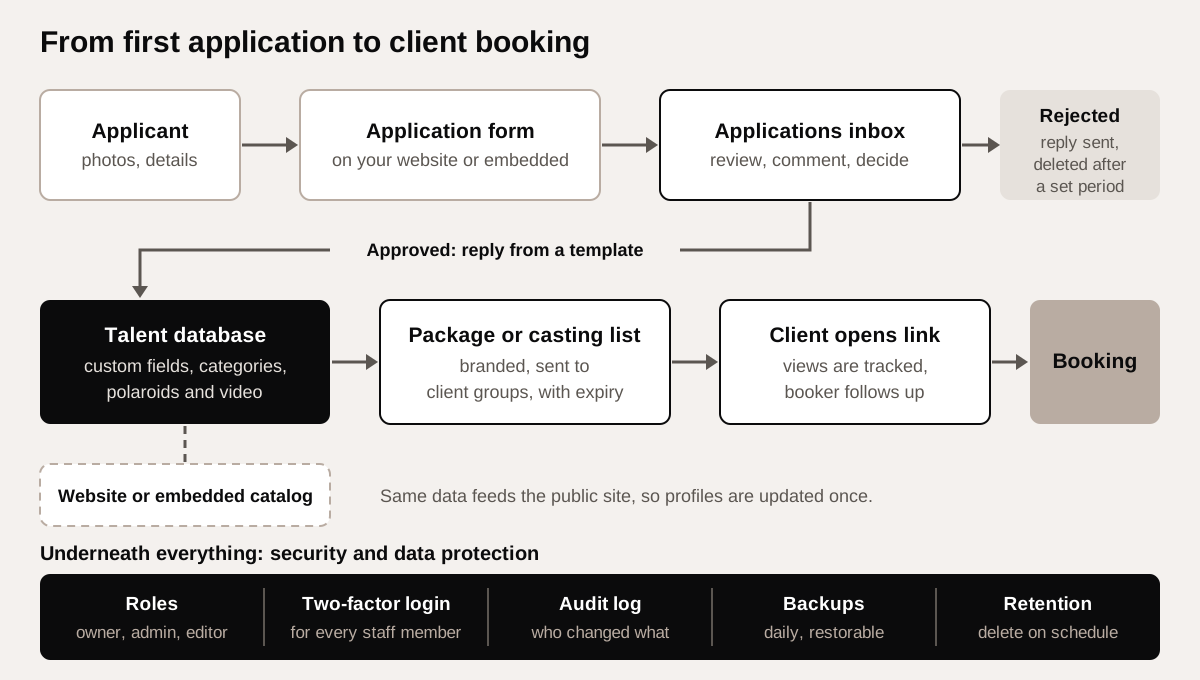
- The core is a talent database with custom fields, polaroids and video, linked to an applications inbox and client packages.
- Client links should be branded, expire, and show you when they were viewed.
- Security is not optional: role permissions, two-factor login and an audit log.
- Under the GDPR you must keep data only as long as needed, so choose software that can delete rejected applications on a schedule.
What is talent management software for agencies?
The phrase covers two different products. In HR, talent management software manages a company's own employees: hiring, reviews, training. In the modeling, acting and influencer business, it means the system an agency uses to manage the people it represents and the clients who book them. Casting software is used by casting directors and producers, and by agencies when they prepare castings for clients.
When you search or ask vendors, describe the job, not the label. An agency system needs to handle:
- A talent database with images, measurements and notes.
- Applications from new faces and scouting leads.
- Packages and casting lists for clients.
- Your public website or catalog.
- Staff roles, security and data protection.
What should the talent database do?
The database is where bookers spend their day. Test it with real profiles, not demo data.
- Custom fields: measurements in your units, sizes, hair and eye color, languages, skills, union status, home city, travel documents. Each agency and market needs different fields.
- Categories: boards such as women, men, new faces, curve, classic, kids or creators, with talent able to sit in more than one.
- Images: portfolio, polaroids (digitals) and video, ordered and dated so clients see current pictures.
- Internal notes: availability, exclusivities, client feedback, visible to staff only.
- Search and filters: by any field, so a booker can build a shortlist in minutes.
Be careful with sensitive fields. The GDPR treats data revealing racial or ethnic origin and data concerning health as special categories, which may only be processed under specific conditions. Many agencies record appearance-related information for castings; decide with your adviser what you actually need, what legal basis applies, and who can see it.
Minors and guardians
If you represent children or teenagers, the database should store a parent or guardian as the main contact, keep the minor's own contact details and documents visible only to the staff who need them, and make it easy to see the age of each person in a package before it goes to a client. Child performance and working rules differ by country, so the fields you need, such as permits or chaperone details, depend on your markets.
How should applications and scouting intake work?
Applications are the agency's pipeline and its largest privacy risk: many people, many photos, most of whom you will not sign. A good intake flow has four parts.
- A form on your website that asks only for what you need to decide: name, contact, age, city, height, a few natural photos.
- An applications inbox where scouts and bookers review, comment and decide.
- Replies from templates, editable, and ideally in the applicant's language, so every applicant gets an answer.
- Retention rules: a set period after which rejected applications are deleted automatically.
The last point is a legal requirement in practice. The GDPR says personal data should be kept no longer than necessary for its purpose, and the UK regulator, the ICO, advises a retention policy with standard periods and regular review. If your open calls bring in hundreds of applicants, see our guides to the open casting call and the work of a model scout for how intake fits the wider scouting process.

Packages, casting lists and client links
Clients and casting directors rarely browse your full board. They want a short, current selection for their job. Casting software features matter here:
- Packages: a curated set of talent with chosen images, sent as one link.
- Casting lists: a selection tied to a specific brief, which the client can review.
- Branding: the page and the email carry your agency's identity, not the vendor's.
- Expiry: links stop working after a date you set, so old selections with old photos do not circulate.
- View tracking: you see whether and when the client opened the package, which tells your booker when to follow up.
- Client groups: clients organized by type or market, so you send the right board to the right people.
A useful package answers the client's questions without a follow-up call: current polaroids first, a few strong portfolio images, a short video where you have one, measurements, the city the person is based in, and a short note from the booker on why they fit the brief. Your booking agents should be able to build one from a brief in minutes, and resend an updated version when new digitals come in.
Expiry is also good data practice: a package shares personal data with a third party, and limiting how long the link works limits that sharing. For the client side of the process, see what a casting director does.

Your website and embeddable catalog
Many agencies run their public site on a separate system and update talent twice: once internally, once on the website. That causes outdated pictures and former talent still online. Look for software that either powers the agency website directly or provides a catalog and application form you can embed in your existing site, fed from the same database. Ask how fast changes appear and whether you can hide a profile from the public site while keeping it internal.
Before images go public or into packages, make sure you hold the rights to use them from the photographer and, where needed, the talent.
Try it: Model release form, to record image permissions before photos go on your website or into client packages.
Permissions, security and audit
An agency database holds addresses, passport details, minors' information and private images. Treat access accordingly.
- Roles: at least owner, admin and editor, so interns or freelancers do not see contracts or delete profiles.
- Two-factor authentication: CISA, the US cybersecurity agency, describes multifactor authentication as a key protection because a password alone is not enough. Prefer software where it is mandatory, not optional.
- Audit log: a record of who changed or exported what, and when.
- Backups: daily or more often, with a tested restore.
The GDPR's security article requires measures appropriate to the risk, including the ability to restore access to data after an incident. Ask vendors to show you these features, not describe them.

GDPR checklist for choosing casting software
If you operate in the EU or handle EU residents' data, you are the controller and the software vendor is usually your processor. The GDPR requires you to use only processors that give sufficient guarantees, under a written contract. Ask each vendor:
- Do you sign a data processing agreement, and which subprocessors do you use?
- Where is data hosted? If outside the EU, which transfer mechanism applies? The European Commission lists countries with adequacy decisions.
- Can we set retention periods and delete data automatically?
- Can we export all our data, including images, in a usable format?
- What security measures apply: two-factor login, roles, encryption, backups, audit logs?
- How do you handle a data subject's request to see or delete their data?
The UK applies equivalent rules under the UK GDPR. Outside Europe, check your local privacy law; it may be less strict, but your EU clients and talent will still expect this standard. Have contracts and policies checked locally.
How to compare your options fairly
There is no single right product. The right choice depends on the size of your board, how many staff share it, your markets and your budget. Most agencies choose between four approaches.
| Approach | Strengths | Weak points | Fits |
|---|---|---|---|
| Spreadsheets and shared drives | Cheap, familiar, flexible | No packages, weak permissions, no retention control | Very small boards, early stage |
| Generic CRM | Good contact and deal tracking | Not built for images, polaroids, packages or boards | Agencies with heavy sales pipelines |
| Agency-specific software | Built around talent, applications and client packages | Monthly cost, migration effort, depends on the vendor | Most model, talent and creator agencies |
| Custom build | Exactly your process | Cost, maintenance and security fall on you | Large agencies with in-house developers |
Score each candidate on the same criteria: the database and fields, applications and replies, packages and client links, website integration, roles and security, GDPR features, export, support language, and price over three years including migration. Run a two-week trial with one board and two bookers before deciding.
As one example of agency-specific software, Agency OS covers a model database with custom fields and categories, polaroids and video, an applications inbox with approve and reject replies in the candidate's language from editable templates, client groups, branded packages and casting lists with expiry and view tracking, sending portfolios and polaroids to clients by email in the agency's branded template, an agency website or embeddable catalog and application form, owner, admin and editor roles, mandatory two-factor authentication, an audit log, automatic deletion of rejected applications after a chosen period, EU hosting with daily backups, an admin in English and Lithuanian, and migration from WordPress. Compare it against the same criteria as any other option.
How to migrate to new talent management software, step by step
- Inventory what you have. Spreadsheets, old website, email folders, image drives. Note which is the most current source for each board.
- Clean before you move. Remove former talent you no longer represent and applications past your retention period. Moving old data only moves the problem.
- Map fields. Decide which old columns become which custom fields, and fix units and spelling.
- Move images with order and dates. Keep portfolio, polaroids and video separate.
- Test with one board. Let two bookers build real packages for a week.
- Move the website. If your old site runs on WordPress, ask whether the vendor migrates profiles and pages from it, and set redirects from old profile URLs.
- Set roles and two-factor login for every staff member before go-live.
- Switch and retire. Set a cut-over date, then delete or securely archive old copies so personal data does not live in two places.
Mistakes to avoid
- Choosing on the demo alone, without testing real profiles and real packages.
- Sending clients links that never expire.
- Shared logins for the whole office, with no audit trail.
- Keeping every application forever "in case".
- Collecting sensitive data fields nobody needs for castings.
- Ignoring export: if you cannot get your images and data out, you are locked in.
- Migrating everything, including former talent and outdated photos.
For day-to-day templates that sit alongside any system, see the toolkit.
Frequently asked questions
What is the difference between talent management software and casting software?
For agencies, talent management software manages the people you represent and your applicants. Casting software focuses on building and sharing shortlists with clients. Most agencies need both in one system.
Can a small agency manage with spreadsheets?
At the start, yes. Problems appear when several staff share data, clients expect branded packages, and you need retention and access control for GDPR.
How long can we keep rejected applications?
No longer than necessary for the purpose. The GDPR does not set one number; set a period in your retention policy, tell applicants, and delete automatically when it ends.
Is two-factor authentication really necessary?
Your database holds private images, addresses and minors' details. CISA advises multifactor authentication because passwords alone are not enough, and the GDPR requires security appropriate to the risk.
Should client packages expire?
Yes, in most cases. Expiry stops old photos circulating and limits how long personal data is shared with third parties.
How long does migration take?
It depends on the number of profiles and images and how clean your current data is. Cleaning and field mapping usually take longer than the technical import.